Lab 1: Xv6 and Unix Utilities
1. 实验介绍
在这个实验中,我们会写5个xv6的用户态的小工具程序。在这个过程中,可以学习到如何运行使用xv6,并对xv6的系统调用的用法有初步的了解。
2. 实验代码实现
sleep
实现xv6版本的UNIX程序 sleep 。
代码实现:
#include "kernel/types.h"
#include "kernel/stat.h"
#include "user/user.h"

int
main(int argc, char *argv[])
{
    if(argc != 2)
    {
        fprintf(2, "Usage: sleep [n_ticks]...\n");
        exit(1);
    }

    if(sleep(atoi(argv[1])) < 0)
    {
        fprintf(2, "Running sleep fails!\n");
        exit(1);
    }
    exit(0);
}
sleep 实现主要帮助我们熟悉xv6的系统调用流程,实现起来较为简单。
pingpong
通过UNIX系统调用实现两个进程间通过管道相互传送一个字节。
代码实现:
#include "kernel/types.h"
#include "kernel/stat.h"
#include "user/user.h"

int
main(int argc, char *argv[])
{
    // create a pair of pipes
    int p[2];
    pipe(p);

    // some random character
    char c = 'a';

    // child process
    if(fork() == 0)
    {
        read(p[0], &c, sizeof(c));
        printf("%d: received ping\n", getpid());
        write(p[1], &c, sizeof(c));
        close(p[0]);
        close(p[1]);
        exit(0);
    }
    else // parent process
    {
        write(p[1], &c, sizeof(c));
        wait(0);
        read(p[0], &c, sizeof(c));
        printf("%d: received pong\n", getpid());
        close(p[0]);
        close(p[1]);
    }
    exit(0);
}
pingpong 主要我们熟悉 xv6 中 pipe/fork/read/write 等系统调用的使用,以及进程间如何通过管道进行通信,实现较为容易。
primes
通过管道实现一个并发版本的素数筛。
错误的代码实现:
#include "kernel/types.h"
#include "kernel/stat.h"
#include "user/user.h"

int
pipeline(int fd_read, int num)
{
    int pd[2];
    pipe(pd);
    int i;

    // child process write to new pipe
    if(fork() == 0)
    {
        while(read(fd_read, &i, sizeof(i)))
        {
            if(i % num != 0)
                write(pd[1], &i, sizeof(i));
        }
        close(pd[0]);
        close(pd[1]);
        exit(0);
    }
    // parent process waits for child
    wait((int *)0);
    close(pd[1]);
    return pd[0];
}

int
main(int argc, char *argv[])
{
    int p[2];
    pipe(p);
    int prime;
    int fd_read = p[0];

    // main process feeds number 2-35
    for(int i = 2; i <= 35; i++)
        write(p[1], &i, sizeof(i));

    close(p[1]);

    while(read(fd_read, &prime, sizeof(prime)))
    {
        printf("prime %d\n", prime);
        fd_read = pipeline(fd_read, prime);
    }

    exit(0);
}
这里的 错误 的含义不是说代码运行的结果不符合预期,而是指实现的方式并非是并发的方式。并发的方式是指进程读取左邻进程的管道,然后写入右邻进程的管道,两者之间是并发进行的。 而上述的实现是筛选完左邻进程管道的数后,再由右邻,也就是新进程读取管道的值,不符合[0]中伪代码及图所描述的情况。 在参考[1]中第2页的代码实现后,完成以下并发代码的实现。
正确的代码实现:
#include "kernel/types.h"
#include "kernel/stat.h"
#include "user/user.h"

void
pipeline(int *p)
{
    int pchild[2];
    int prime;

    close(p[1]);      // close parent pipe write fd

    // if process reads no more data from pipe, just exits
    if(read(p[0], &prime, sizeof(prime)) == 0)
        exit(0);

    pipe(pchild);
    if(fork()) // main process filters the primes
    {
        int n;
        printf("prime %d\n", prime);
        while(read(p[0], &n, sizeof(n)))
        {
            if(n % prime != 0)
                write(pchild[1], &n, sizeof(n));
        }
        close(p[0]);      // close parent pipe read fd
        close(pchild[1]); // close child pipe write fd
        close(pchild[0]); // close child pipe read fd
        wait((int *)0);
        exit(0);
    }
    else // spawn child process to read from filtered prime numbers
    {
        pipeline(pchild);
    }
}

int
main(int argc, char *argv[])
{
    int p[2];
    pipe(p);

    // main process feeds number 2-35
    if(fork())
    {
        for(int i = 2; i <= 35; i++)
        {
            write(p[1], &i, sizeof(int));
        }
        close(p[0]);
        close(p[1]);
        wait((int *)0);
    }
    else // child process starts the pipeline
    {
        pipeline(p);
    }

    exit(0);
}
正确 的实现逻辑是在流水线里每次 fork 一个子进程,父进程将筛选后的数写入管道,等待子进程结束。子进程读取管道,再 fork 自己的子进程,重复其过程。
这种方式就不必等待父进程筛选结束后再执行下一流程,从而实现了真正的并发。
另外,在实现过程中,一定要注意及时关闭不再使用的文件描述符。如在 pipeline 函数 fork 子进程前,关闭父进程的管道读文件描述符。否则在 fork 执行后的父进程中再去关闭,就会有文件描述符不够引发错误的风险。
primes 的实现难度在于理解材料中的并发模型,并且在实现中要考虑到诸多细节(文件描述符及时关闭)。
find
实现一个简易版本的UNIX find 程序。
代码实现:
  #include "kernel/types.h"
  #include "kernel/stat.h"
  #include "user/user.h"
  #include "kernel/fs.h"

  void
  find(char *dirname, char *filename)
  {
      char buf[512], *p;
      int fd;
      struct dirent de;
      struct stat st;

  if((fd = open(dirname, 0)) < 0){
      fprintf(2, "find: cannot open %s\n", dirname);
      return;
  }

  if(fstat(fd, &st) < 0){
      fprintf(2, "ls: cannot stat %s\n", dirname);
      close(fd);
      return;
  }

  switch(st.type){
      case T_DEVICE:
      case T_FILE:
          break;

      case T_DIR:
          strcpy(buf, dirname);
          p = buf+strlen(buf);
          *p++ = '/';
          while(read(fd, &de, sizeof(de)) == sizeof(de)){
              if(de.inum == 0)
                  continue;
          // ignore "." and ".."
          if(!strcmp(de.name, "."))
              continue;
          if(!strcmp(de.name, ".."))
              continue;

          memmove(p, de.name, DIRSIZ);
          p[DIRSIZ] = 0;

          if(stat(buf, &st) < 0){
              printf("find: cannot stat %s\n", buf);
              continue;
          }
          if(st.type != T_DIR){
              if(!strcmp(de.name, filename)) // compare name strings
                  printf("%s\n", buf);
              }else{
                  find(buf, filename); // recursively find files in sub-directory
              }
          }
          break;
  }
close(fd);
  }
  int
  main(int argc, char *argv[])
  {
      char *dirname;
      char *filename;

      // check CLI paramenters
      if(argc != 3){
          fprintf(2, "usage: find [directory] [file]\n");
          exit(1);
      }

      dirname = argv[1];
      filename = argv[2];

      // call find to find wanted file
      find(dirname, filename);

      exit(0);
  }
find 需在理解 ls 如何读取目录文件的基础上,添加递归代码实现子目录内容的读写。
xargs
实现一个简易版本的UNIX xargs 程序,但对于从标准输入读入的内容,xargs 会单独执行每行内容。
代码实现:
#include "kernel/types.h"
#include "kernel/stat.h"
#include "kernel/param.h"
#include "user/user.h"

int
my_readline(int fd, char *buf)
{
    char ch;
    int count = 0;
    while(read(fd, &ch, sizeof(ch)))
    {
        if(ch == '\n')
            break;
        buf[count++] = ch;
    }
    buf[count] = '\0';
    return count;
}

int
main(int argc, char *argv[])
{
    char *cmd;
    char *my_argv[MAXARG];
    char buf[512];

    if(argc < 2)
    {
        fprintf(2, "Usage: xargs needs one more parameter\n");
        exit(1);
    }

    // parse argument follow by xargs
    cmd = argv[1];
    for(int i = 1; i < argc; i++)
        my_argv[i-1] = argv[i];

    // read from stdin and add result to argv list
    while(my_readline(0, buf))
    {
        my_argv[argc-1] = buf;
        if(fork() == 0)
            exec(cmd, my_argv);
        else
            wait((int *)0);
        // remember to zero buf
        memset(buf, 0, sizeof(buf));
    }
    exit(0);
}
xargs 的难点在于如何处理 stdin 的每行数据(即如何用 read 实现一个简单的 readline 函数),针对每行数据使用 fork + exec 处理。
另外要注意的是 xv6 中的 exec 参数的使用,第二个参数的 char *argv[] 应包含命令本身,即代码中的 for 循环中 i 是从1开始,而不是2。
实验最终结果
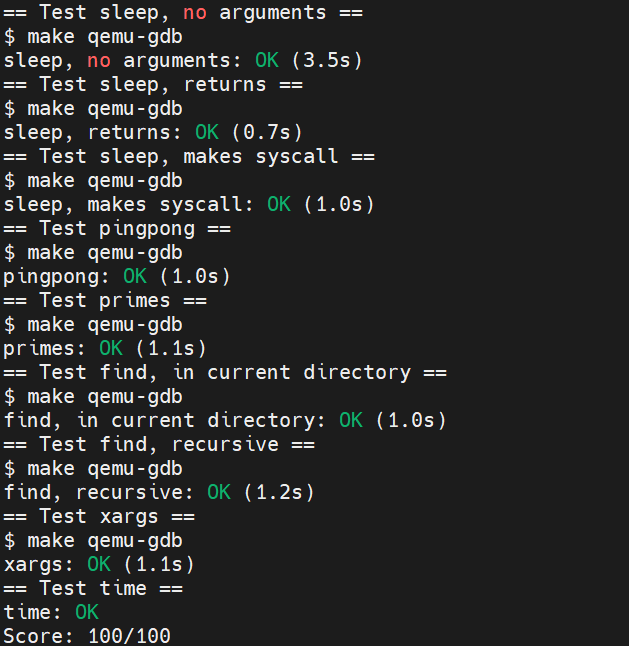
实验最后还需要添加 time.txt 文件记录实验所花费的时间。敲入 make grade 命令,可看到实验得分满分。
3. 实验总结
虽然在5月份的封锁在家的时候lab1和lab2完成了,但重新做了一遍lab1的内容才发现很多概念当时理解的并不正确,尤其是实现 primes 过程中对并发的理解。
实验大概断断续续花了一周的时间,估计有15h左右。除 primes 外,其余皆是独立完成,比当时写不出来就去找代码还是有些进步的。